package ochre-cli
All checked builds passInstall
dune-project
Dependency
Authors
Maintainers
Sources
sha256=a8e38fbcd22fbb68b0f7d93b36a2ba1670e8bd061b43a0177226738307183a32
sha512=7b344c3812be283b0101078564e564732f878ad226c7ce0212c9e9139fb41a291e4d31ad52c949f2978c48e04240d4d22b5b4ae63808e15a21c44a2fbeed8a22
Description
CLI tool for highlighting source code using TextMate grammars and themes.
Added to opam-repository:
README
ochre
A syntax highlighter for OCaml using TextMate grammars and themes, inspired by Shiki.

Installation
opam install ochre -yQuick start
let theme = Ochre.Theme.nord in
let highlighter = Ochre.load_from_files_exn ["path/to/ocaml.tmLanguage.json"] in
let html = Ochre.to_html highlighter ~theme ~lang:"ocaml" source_code
Load any TextMate grammar with tm-grammars
tm-grammars packages a collection of TextMate grammars for OCaml, so you can load grammars in ochre without managing JSON files on disk.
Install the bundled grammar package:
opam install tm-grammars -yThen load a grammar from OCaml and create a highlighter:
let theme = Ochre.Theme.nord in
let highlighter = Ochre.load_exn [ ("ocaml", Tm_grammars.ocaml) ] in
let html = Ochre.to_html highlighter ~theme ~lang:"ocaml" "let x = 42"
Output formats
ochre can render highlighted code to several output formats (also called backends):
- HTML — Self-contained
<pre><code>blocks with inline styles or CSS classes. Supports multi-theme via CSS custom properties, line numbers, and configurable class prefixes. See rendered example. - SVG — Standalone
<svg>elements with monospace<text>and per-token<tspan>styling. Open preview: SVG rendered example. Source: .svg file. - ANSI — 24-bit color escape sequences for terminal display.
- LaTeX —
\textcolorcommands inside anochrehighlightenvironment. Requires thexcolorandsoulpackages. See rendered PDF (source: .tex file). All backends share the same interface: create a highlighter, pick a theme, and call the correspondingto_*function.
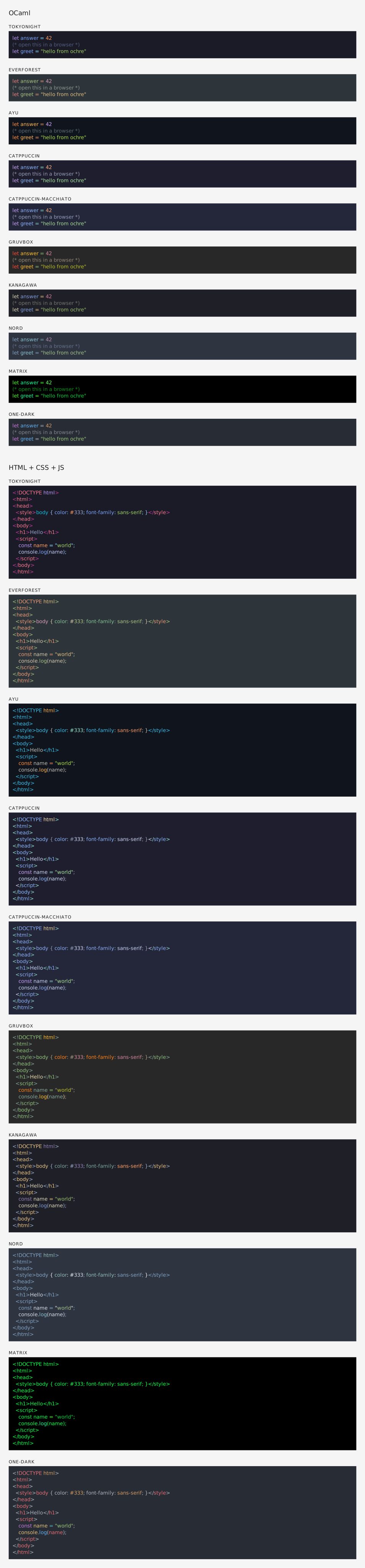

Documentation
Contribute
Set up the development environment:
make initBuild the project:
make buildRun the test suite:
make testYou can also preview highlighted output in a browser with make test-browser, which serves a sample on port 5000.
Credits
- Inspired by Shiki by Pine Wu and Anthony Fu
- Uses textmate-language and ocaml-oniguruma by Alan Hu
Dependencies (6)
- dune-build-info
-
cmdliner
>= "1.1.0" -
tm-grammars
>= "2.0.0" -
ochre
= version -
ocaml
>= "4.14.0" -
dune
>= "3.22"
Optional Dependencies
None
Used by
None
Conflicts
None
Build status
Results of building ochre-cli with each compiler on check.ci.ocaml.org, run of against opam-repository 78c202b. All results for this package.
Each result links to its build log. To keep crawlers from overloading the site, build logs require a GitHub sign-in (see ocurrent/opam-health-check). On your first log, GitHub asks you to “Authorize opam-health-check”, the OCurrent app that runs these checks; it sees only your public profile, not your repositories. The sign-in lasts 30 days.
| Version | OCaml 4.11 | OCaml 4.14 | OCaml 5.2 | OCaml 5.4 | OCaml 5.5 |
|---|---|---|---|---|---|
| 1.1.0 (this version) | n/a | good | good | good | good |
- good Package successfully built
- partial One of the dependencies failed to build
- bad Package failed to build
- n/a Package is not available in this environment
- internal Internal failure