package ochre
All checked builds passInstall
dune-project
Dependency
Authors
Maintainers
Sources
sha256=a8e38fbcd22fbb68b0f7d93b36a2ba1670e8bd061b43a0177226738307183a32
sha512=7b344c3812be283b0101078564e564732f878ad226c7ce0212c9e9139fb41a291e4d31ad52c949f2978c48e04240d4d22b5b4ae63808e15a21c44a2fbeed8a22
Description
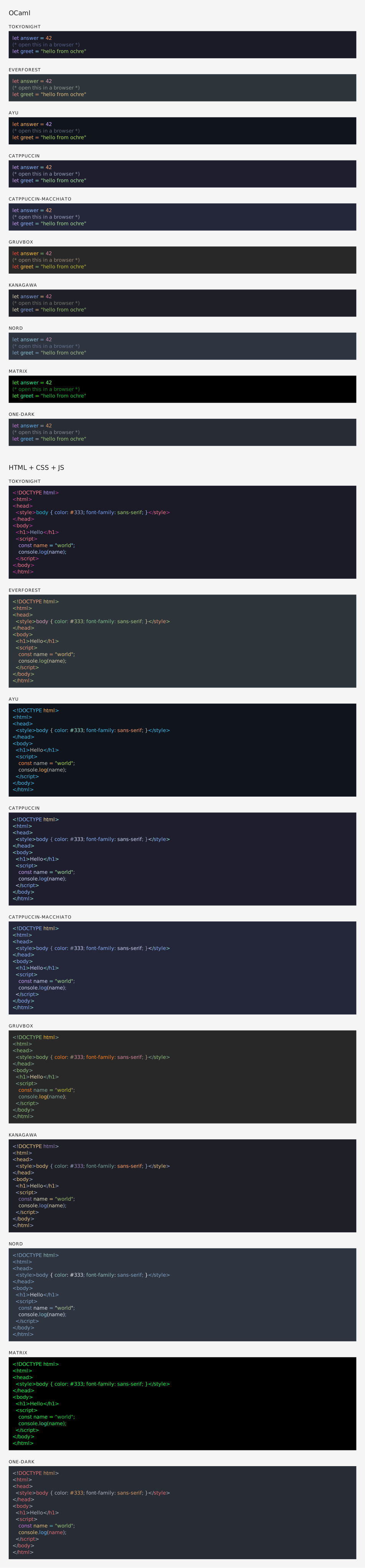
ochre is a syntax highlighter inspired by Shiki, using TextMate grammars and themes. It supports HTML output (inline styles or CSS classes), ANSI terminal colors, LaTeX, SVG, and raw token output.
Added to opam-repository:
README
ochre
A syntax highlighter for OCaml using TextMate grammars and themes, inspired by Shiki.

Installation
opam install ochre -yQuick start
let theme = Ochre.Theme.nord in
let highlighter = Ochre.load_from_files_exn ["path/to/ocaml.tmLanguage.json"] in
let html = Ochre.to_html highlighter ~theme ~lang:"ocaml" source_code
Load any TextMate grammar with tm-grammars
tm-grammars packages a collection of TextMate grammars for OCaml, so you can load grammars in ochre without managing JSON files on disk.
Install the bundled grammar package:
opam install tm-grammars -yThen load a grammar from OCaml and create a highlighter:
let theme = Ochre.Theme.nord in
let highlighter = Ochre.load_exn [ ("ocaml", Tm_grammars.ocaml) ] in
let html = Ochre.to_html highlighter ~theme ~lang:"ocaml" "let x = 42"
Output formats
ochre can render highlighted code to several output formats (also called backends):
- HTML — Self-contained
<pre><code>blocks with inline styles or CSS classes. Supports multi-theme via CSS custom properties, line numbers, and configurable class prefixes. See rendered example. - SVG — Standalone
<svg>elements with monospace<text>and per-token<tspan>styling. Open preview: SVG rendered example. Source: .svg file. - ANSI — 24-bit color escape sequences for terminal display.
- LaTeX —
\textcolorcommands inside anochrehighlightenvironment. Requires thexcolorandsoulpackages. See rendered PDF (source: .tex file). All backends share the same interface: create a highlighter, pick a theme, and call the correspondingto_*function.

Documentation
Contribute
Set up the development environment:
make initBuild the project:
make buildRun the test suite:
make testYou can also preview highlighted output in a browser with make test-browser, which serves a sample on port 5000.
Credits
- Inspired by Shiki by Pine Wu and Anthony Fu
- Uses textmate-language and ocaml-oniguruma by Alan Hu
Dependencies (7)
-
plist-xml
>= "0.5.0" -
dune-configurator
>= "2.9" & build - conf-oniguruma
-
melange-json-native
>= "2.0.0" -
yojson
>= "2.0.0" -
ocaml
>= "4.14.0" -
dune
>= "3.22"
Dev Dependencies (11)
-
ocamlformat
= "0.29.0" & with-dev-setup -
ocamlformat-mlx
with-dev-setup -
ocamlmerlin-mlx
with-dev-setup -
ocaml-lsp-server
with-dev-setup -
mlx
with-test -
alcotest
with-test -
tm-grammars
>= "2.0.0" & with-test -
odoc
>= "3.1.0" & with-doc -
tiny_httpd
with-test -
html_of_jsx
>= "0.0.9" & with-test -
ezjsonm
with-test
Optional Dependencies
None
Used by (2)
-
html_of_jsx
>= "0.0.9" -
ochre-cli
>= "1.1.0"
Conflicts
None
Build status
Results of building ochre with each compiler on check.ci.ocaml.org, run of against opam-repository 8a77e58. All results for this package.
Each result links to its build log. To keep crawlers from overloading the site, build logs require a GitHub sign-in (see ocurrent/opam-health-check). On your first log, GitHub asks you to “Authorize opam-health-check”, the OCurrent app that runs these checks; it sees only your public profile, not your repositories. The sign-in lasts 30 days.
| Version | OCaml 4.11 | OCaml 4.14 | OCaml 5.2 | OCaml 5.4 | OCaml 5.5 |
|---|---|---|---|---|---|
| 1.1.0 (this version) | n/a | good | good | good | good |
- good Package successfully built
- partial One of the dependencies failed to build
- bad Package failed to build
- n/a Package is not available in this environment
- internal Internal failure