Blog
The OCaml Planet RSS
Articles and videos contributed by both experts, companies and passionate developers from the OCaml community. From in-depth technical articles, project highlights, community news, or insights into Open Source projects, the OCaml Planet RSS feed aggregator has something for everyone.
Want your Blog Posts or Videos to Show Here?
To contribute a blog post, or add your RSS feed, check out the Contributing Guide on GitHub.
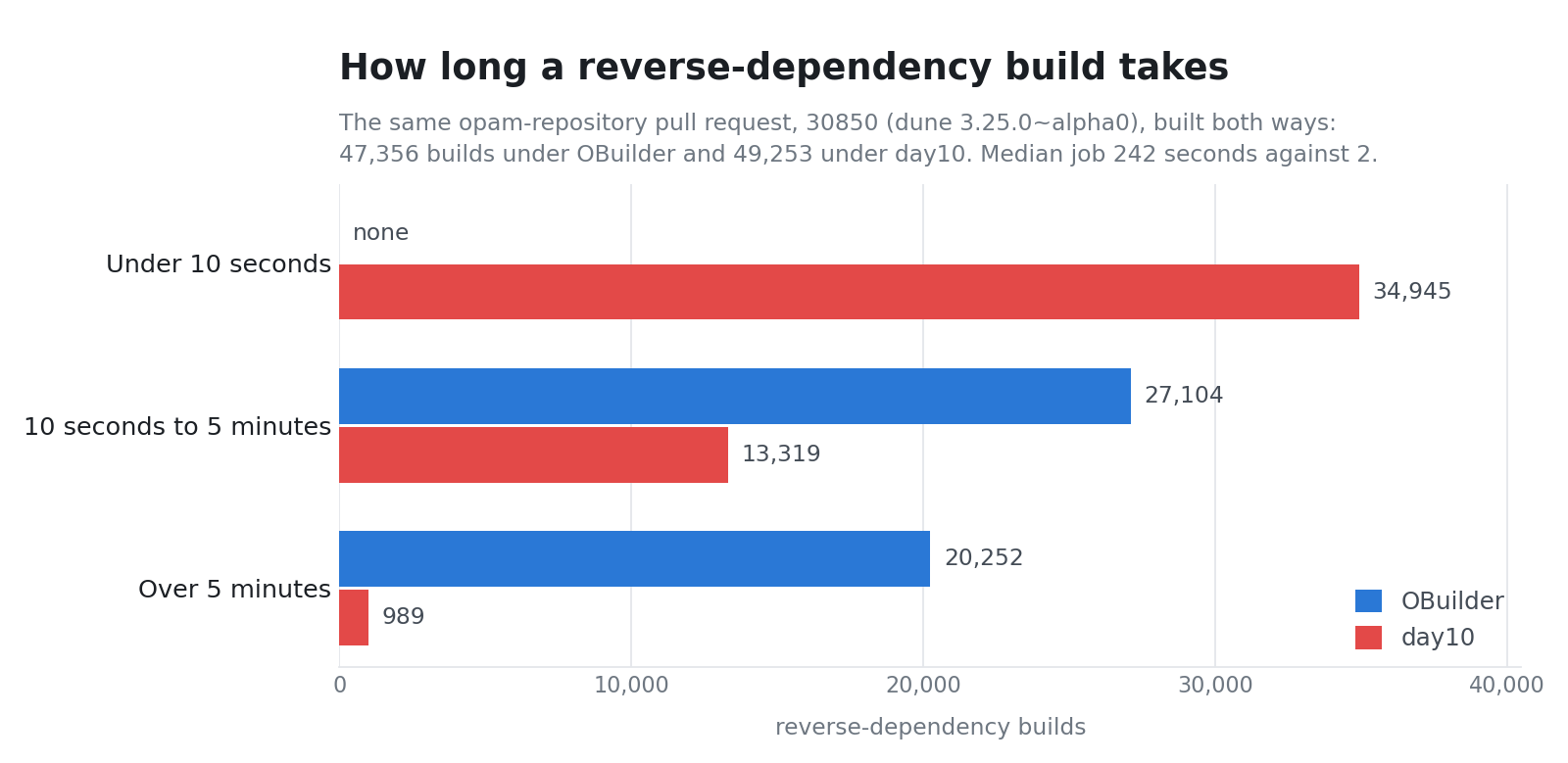
day10 reverse dependencies are live and found a dune regression; the aardvark 2017 run finished; and the v2~beta1 Zarr store was rebuilt on a grid that no longer depends on its own data.
John Crepezzi has spent his career building tools for other programmers—at Tumblr, at Square, and then at GitHub, where he worked on the merge queue and the early versions of Codespaces. He came to Jane Street to build a code search engine for OCaml. A week into the job, ChatGPT came out, and he’s been working on AI tooling ever since. In this episode, Ron and John talk about how a three-day prototype grew into a firmwide platform for agentic coding, how AI can break the social contract around code review, and how to build tools that support both agent workflows and human understanding.You can find the transcript for this episode on our website.Some links to topics that came up in the discussion:QBasicPirates of Silicon ValleyHoogle — the Haskell API search engine that inspired the original code-search projectGitHub merge queue and CodespacesSorbet — gradual typing for Ruby; Hack — Meta’s typed PHPActive RecordBubblewrap and passt/pasta — sandboxing toolsseccomp BPFClaude Code and OpenAI Codex CLIModel Context Protocol and Agent SkillsPerfetto and magic-traceAntithesisBonsai — Jane Street’s OCaml web UI librarySignals & Threads: Language Design with Leo White

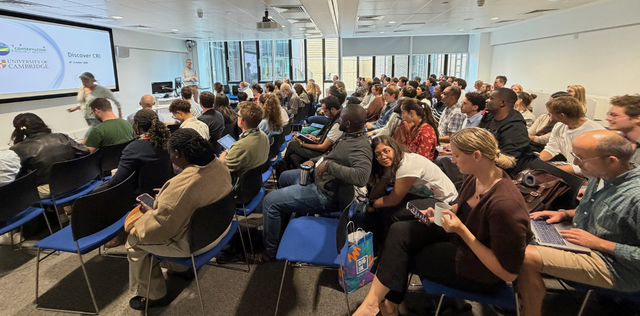
Yesterday evening I was at the first Thought Experiment, a new series of informal evenings on how "AI is changing the way we code, find vulnerabilities, and prove theorems". It was held at the Paris School of AI, which turns out to be a few hundred metres from the Tarides office, and it was cheerfully organised by Caterina Urban and Karthik Bhargavan, with whom we are sending formally verified post-quantum cryptography to space. Message sequence charts for agents Benedikt Bollig (CNRS, LMF) asked whether AI agents can be made to coordinate safely. I read his papers on message sequence charts (MSCs) during my PhD, when I was working on scenario languages built on the same formalism, so I was curious to see where he would take them twenty years later. The answer is agentic workflows. An MSC draws each participant as a lifeline and each message as an arrow between two of them, and that is a good fit for a system of agents: the message-passing structure around the LLM calls is where deadlocks and type-mismatched messages live, and that part can be checked. His paper with Matthias Függer and Thomas Nowak (ISoLA 2026) turns this into a small language in which every choice and every loop is decided by one named participant, who tells the others which branch was taken. A projection then generates each agent's local program from the global chart, deadlock-free by construction whatever the LLM calls return. There is a Python implementation called ZipperGen. Writing an exchange down once and cutting out each participant's part has a long history, from the realisability of MSCs studied by Alur, Etessami and Yannakakis to the multiparty session types of Honda, Yoshida and Carbone; I spent a few years myself generalising these techniques to more abstract partial-order automata. They stayed in papers because a global specification is long and precise, the proof that an implementation follows it is longer still, and few projects could afford to write either by hand. Over the past year that cost has collapsed, because models now write the verbose parts. So the same ideas are resurfacing twenty years later, with concrete applications, and I find that fascinating. I have also tried to revive those ideas recently, in a new framework I called ocaml-fsm (it now handles symbolic state machines too, so I should think of another name before a proper release :p). It is early days and very much a prototype, limited to Mazurkiewicz traces for now, with full pomset automata cooking. Used as an oracle, though, it has already found bugs in reviewed and tested code, such as a security association in our CCSDS stack that could be neither created nor deleted. Compared with Benedikt's agents, it works one level down, on the finite control of protocols such as HTTP/2, SSH or the CCSDS security layer, and at the same level in mq, my merge queue, where landing a branch is one description of the flow between the caller, the hook that admits the entry, the run that holds the lock and the resolver that takes its conflicts. The rule is one exhaustive OCaml function. The tool evaluates it over the finite domains of states and inputs, and reports the states the code can never reach and the arrows it can never take, each with the shortest sequence of messages that shows it. Fsm.Global.project does the projection, cutting each party's machine out of one description of the whole exchange, on the boxed-pomset theory Loïc Hélouët and I worked out in 2007 (so the talk felt like familiar ground). A keepalive protocol is written once for both parties, one arrow per message, and the sender of a message the standard leaves optional is the one who decides: let keepalive ping = Fsm.Global.v ~name:"keepalive" ~initial:Fresh ~roles:[ Client; Server ] ~pp_role ~controls:[ Fresh; Live; Over ] ~pp_control:pp_phase ~arrows: [ Fsm.Global.arrow ~sender:Client ~receiver:Server Hello; Fsm.Global.arrow ~sender:Client ~receiver:Server Ping; Fsm.Global.arrow ~sender:Client ~receiver:Server Bye; ] ~pp_message ~error:pp_error ~finals:[ Over ] (fun phase (arrow : (role, message) Fsm.Global.arrow) -> match (phase, arrow.message) with | Fresh, Hello -> Fsm.goto Live ~effects:[] | Fresh, (Ping | Bye) -> Fsm.refuse Not_open ~effects:[] | Live, Hello -> Fsm.refuse Busy ~effects:[] | Live, Ping -> ping () | Live, Bye -> Fsm.goto Over ~effects:[] | Over, (Hello | Ping | Bye) -> Fsm.refuse Finished ~effects:[]) Fsm.Global.project then gives each party its own automaton. The client may send a ping or not; the server takes it whenever it comes. # let () = show_party Client "send ping to server";; live on send ping to server: goto live live on send ping to server: reject quiet latitude on send ping to server in live: Example 5.1, recommended false # let () = show_party Server "receive ping from client";; live on receive ping from client: goto live no latitude The realisability check runs when the description is built, so a test that constructs it is enough to catch it (the types do not, yet). If accepting the ping could lead to two different phases, the server could not tell from the message which one the client chose, so the constructor refuses the description. The message names the cell, the ping at live, and the two phases, live and over, that the receiver would have to choose between without being told. keepalive (fun () -> Fsm.may ~clause:"Example 5.2" [ Fsm.goto Live ~effects:[]; Fsm.goto Over ~effects:[] ]) Proofs on machine code, and the oracle problem Úlfar Erlingsson (Google Cloud Security) had the best title of the evening, "Petrifying the dungheap: Better software through bookkeeping". His starting point is that finding bugs has become so easy that the software we all build on stands revealed as a dungheap. We see it in the OCaml ecosystem too, from two directions. The frontier models now write OCaml well (a few of us wrote last year about what it would take), so the bug and security reports reaching the OCaml compiler and the libraries around it have become noticeably better, and a report now tends to come with a patch that compiles and a test that fails without it. And Scrutineer, Andrew Nesbitt's agentic scanner, finds plenty: by the end of September a dozen OCaml developers were triaging on Anil's instance and twenty-four fixes had been merged in ocaml-tls, ocaml-x509, mirage-crypto and others. Type safety definitely helps here, but there is still a surprising number of bugs lying around in our nice OCaml libraries. Úlfar's bookkeeping is for the code that cannot be rewritten in a safer language, because its performance and memory footprint have to stay where they are, and because even its bugs are part of its contract: fix one and something that relied on it breaks. The idea is to prove pre- and post-conditions directly on the machine code, with neither the source nor the compiler in the trusted base, and to use the proofs to find memory-safety bugs in software as it ships. The proofs are generated, which raises the question every generated artefact raises: is the program the proof was built for the program that ships? His answer is the cheapest oracle there is, a byte-for-byte comparison of the generated binaries. I met the same question porting Tailwind to OCaml, where models wrote much of the code. The first check was bytes against the reference compiler's output, then a CSS-aware diff, because the reference emits spellings that differ without mattering. But a model can change a test and the code it checks in the same commit, so the check that decides has to share no code with either tool. In my case it is Chrome rendering both stylesheets and comparing pixels. Úlfar's bytes and my pixels do the same job. Once a model generates the artefact, the oracle has to sit outside anything the model can touch, and the simpler it is, the easier it is to trust. AI tools for democracy Lê Nguyên Hoang (Télécom Paris) closed with "AI tools to democratically govern AIs". He started from the attacks: AI is being used against democracies everywhere, in disinformation and in the recommendation systems that amplify it. His point is that the same tools can make democracies harder to attack, with better recommender systems and tools for building consensus, and Taiwan's g0v civic-tech community was his running example. (He is also behind Tournesol, a participatory recommender.) I am halfway through Plurality by Glen Weyl and Audrey Tang, so the talk landed on prepared ground. It also made me finish a small thing I had been playing with, a page on French public money that lays out the official figures, each number linking to the Eurostat or Insee cell it came from and the arithmetic in between. It is a visualisation tool and nothing more. I have a few other ideas for this kind of data (one of them is a map of every commune, below), and I will write about them if they become something. The home page of the public-money page. Each underlined figure opens its source. The 35,000 communes, each coloured by the indicator per resident furthest above the French average (energy, water, farmland, building materials, commuting wages, jobs, industrial CO₂), year by year from 2006 to 2027.
Merlin, the foundational library that underpins the reference implementation of the OCaml Language Server Protocol provides a wide range of practical features, including commands, code completion, and much more. It also implements more subtle mechanisms that are essential to delivering a smooth and responsive editing experience. Indeed, the editing environment for a programming language closely resembles the front-end of its compiler. However, whereas a compiler operates on complete, syntactically valid programs, an editor must continuously cope with programs that are incomplete, temporarily inconsistent, and often ill-typed. To handle these transient states, Merlin vendors a modified version of the OCaml compiler front-end (primarily the parser and the type checker), extending it with two recovery mechanisms: Parsing Recovery, which synthesises AST nodes to allow parsing to continue even in the presence of syntax errors. Typing Recovery, which synthesises typed AST nodes, allowing type checking to continue even when type errors are encountered. This article will focus specifically on the second mechanism, typing recovery, and how we upstreamed this feature to the mainline OCaml compiler. Typing Recovery in Action The recovery mechanisms' behaviour is easy to observe in practice. Consider, for example, the following OCaml program: let x = "ten" let y = x + 20 let z = (y + (2 * x)) && true Here, we are faced with three type errors. First, we attempt to add x and 20, which makes no sense since x has type string. Next, we attempt to multiply x (once again) by 2, which is also invalid. Finally, the expression (y + (2 * x)), which is expected to have type int, is instead used as a boolean value. When compiling this program, the OCaml compiler reports only the first type error in the compilation unit: File "lib/test.ml", line 2, characters 8-9: 2 | let y = x + 20 ^ Error: The value x has type string but an expression was expected of type int This is a very sensible design choice. Although OCaml has a highly sophisticated type system, the language's pervasive type inference means that a single mistake can easily trigger a cascade of secondary errors, obscuring the compiler's primary goal: ensuring correctness. However, applying the same strategy in a code editor raises two major (and closely related) issues: An editor that reported errors one at a time would provide a rather poor user experience. More importantly, if type checking or parsing stopped at the first syntax or type error, every feature provided by Merlin that relies on compiler structures – namely the parsetree and the typedtree – would immediately become unavailable. This would be particularly frustrating because, while actively editing a file, the program is almost always in a temporarily invalid state, whether syntactically, semantically, or both. For these reasons, the modified version of the OCaml compiler front-end embedded in Merlin always produces valid ASTs (Parsing Recovery) and typed ASTs (Typing Recovery), allowing the subsequent analysis phases to continue operating on programs that are still being written, whilst collecting errors: These two recovery mechanisms, although arguably among the most interesting features of the language server, are also one of the main reasons why upgrading Merlin to support a new OCaml release is such a challenging process. This effort is known as OCaml Release Readiness. For now, let's take a closer look at why this is the case by focussing specifically on Typing Recovery. Adapting Typing Recovery Across OCaml Versions Without going into too much detail, upgrading Merlin to a new OCaml version involves applying patches coming from two different sources: Compiler patches, corresponding to the various changes made to OCaml over time; Merlin patches, which introduce the recoveries. Because Typing Recovery is deeply intertwined with the various modules involved in OCaml's type-checking process, applying patches from two different sources (with different development cycles) makes version upgrades particularly tedious and introduces two major challenges: Each upgrade takes time, because the vendored version of the compiler front-end must be adapted while preserving all recovery information and fixing the analysis issues naturally introduced by the evolution of OCaml; Handling new recovery cases can be tedious for the people responsible for the upgrade process. Indeed, it is common to apply patches from the compiler side without having a complete understanding of their underlying rationale. For example, OCaml 5.5 recently introduced a new feature that was highly anticipated by the community: module dependent functions. This addition changes how function parameters are handled and requires careful consideration of how recovery should behave in these new situations. For these reasons, Typing Recovery could become unstable (within reasonable scenarios, of course), sometimes introducing small regressions and sometimes lacking support for newly introduced features. Reducing the Differences Between Merlin and OCaml Reducing the differences between Merlin's vendored version of the front-end and the one maintained by OCaml is therefore a crucial task. It not only helps reduce Merlin's maintenance burden, but also gives OCaml maintainers more control over how they want recovery to be handled within the type checker. Of course, this represents an additional responsibility for the maintainers (another one!), but in practice, developers introducing new features in the type checker usually have both a deep understanding of their implementation and a good intuition about how recovery should behave in the presence of errors. Integrating Typing Recovery into the Compiler At the time of writing this blog post, the Typing Recovery mechanism has been merged into the compiler. In this section, we will briefly describe its re-design and direct integration into the compiler's type checker. Typing Recovery has been part of Merlin since its very beginning. Although its implementation relies on very clever encoding, it has aged over time, and its underlying design has become increasingly difficult to understand. Integrating it into the compiler, therefore, provided an opportunity to rethink the mechanism, clean it up, and make its behaviour easier to understand. The goal was to enable a non-intrusive integration, giving maintainers the tools they need to confidently evolve and maintain it in the future. How Recovery Works, at a High Level The core of the OCaml type-checker is implemented as a set of recursive functions responsible for typing the different syntactic categories of the language, notably expressions, patterns, type declarations, modules, and classes. When a type error is encountered, these functions propagate an exception that interrupts the construction of the typing derivation. As mentioned above, the compiler adopts a first-failure reporting strategy, reporting only the first encountered error. To go beyond the first-failure reporting strategy, Merlin instruments the main recursive functions of the type-checker in order to intercept typing exceptions. When an exception is raised, it is caught so that it can be recorded (logged), and typing then resumes at the recursive call level (locally) on the other independent subterms of the program. Thus, even if the typing of a subexpression fails, independent subtrees can still be analysed, which makes it possible to report multiple typing errors within a single analysis. Resuming recursion allows new errors to be discovered, but it is not sufficient to produce an exploitable Typedtree. When a sub-derivation fails, Merlin synthesises an artificial Typedtree node whose typing judgment is that expected by the context in which it is inserted, while also preserving the fragments of the derivation that could be constructed before the typing failure, even if their attachment to the rest of the tree is no longer known. These nodes help preserve the structure of the Typedtree returned by the type-checker and maintain language server functionality despite the presence of errors. However, these generic mechanisms are not sufficient to cover all language constructs. Some phases of the type-checker perform preliminary checks before recursively typing their subterms. When these checks fail, recursion is never engaged, and no partial derivation is produced. For example, record expressions: { my_fst_field = e1; my_snd_field = e2 } The type-checker first attempts to resolve my_fst_field and my_snd_field. If, for instance, my_fst_field does not exist, it gives up without attempting to type e1 and e2. This strategy is suboptimal: subexpressions are never analysed even though they could contain useful information or independent errors. To address this issue, Merlin delays the error by assuming that the field exists. Merlin then temporarily adapts the type-checker by considering that an unknown label is not necessarily a fatal error, but may correspond to a field that will be added later. Typing then proceeds under this assumption, which makes it possible to produce partial derivations for subexpressions and to improve the quality of diagnostics. Another API for Raising Type Errors As the purpose of Typing Recovery is essentially to be managed by Merlin, we do not want to make it the default behaviour; it can therefore be enabled using a flag (-typing-recovery) passed to the compiler (which will be enabled by default by Merlin). In order to make error handling explicit, we introduce two functions intended to replace direct calls to raise in the type-checker. When the -typing-recovery flag is not enabled, these functions behave exactly like raise. In Typing Recovery mode, they record the exception in a dedicated structure, which will then be processed by the recovery handler. Typing_recovery.log_and_raise records the exception before re-raising it. It is used when processing cannot continue locally and captures the general case; Typing_recovery.log_or_raise records the exception without re-raising it when the context is able to perform local recovery, for example, by synthesising an artificial node or by continuing the typing of other subterms; it captures more fine-grained cases. This distinction makes explicit the points where recovery is possible and those where the exception must necessarily be propagated. The API guides the implementation of the type-checker and makes recovery decisions visible when adding or modifying typing rules. Today, we do not have a formal criterion to systematically determine which function to use. The integration into the OCaml type-checker was therefore guided by a large set of unit tests and empirical validation. In practice, the choice between the two functions depends on the expected behaviour of recovery, and is validated by observing the produced diagnostics. This lack of a general criterion aligns with the observations of the paper Merlin: A Language Server for OCaml (Experience Report), which notes that recovery policies would benefit from a more systematic theoretical framework. Forcing User-Facing Error Reporting In Merlin’s historical implementation, the selection of exceptions eligible to trigger a Typing Recovery scenario was mainly based on an empirical approach. The reimplementation in the compiler made it possible to identify a simple design invariant: only exceptions intended to be reported to the user (user-facing errors) should be recorded by the recovery mechanism. Conversely, internal type-checker exceptions, as well as simply re-raised exceptions (reraise), must not be captured. To introduce recovery as a systematic approach, we aim to channel user-facing exceptions so that they are always handled through a pair of functions log_and_raise and log_or_raise. To achieve this, we rely on a property of the OCaml language: exceptions are represented by the extensible type exn. This representation makes it possible to control the introduction of new exception constructors via module interfaces. By making certain exception constructors private in a module signature, it becomes possible to forbid their construction outside this module, while still allowing them to be deconstructed through pattern matching or exception handlers. This technique makes it possible to structure the flow of user-facing errors and to enforce a systematic passage through the associated logging functions. - exception Error of error + module Error : sig + type exn += private In_context of error + end = struct + type exn += In_context of error + + let log_or_raise err = + Type_recovery.log_or_raise (In_context err) + + let log_and_raise err = + Type_recovery.log_and_raise (In_context err) + end This transformation also makes it straightforward to rely on the compiler to guide the implementation by identifying and handling every possible recovery case individually and provide a precise API to handle recovery with or without resumption. Closing Words and Acknowledgements Although there are still some differences between Merlin's vendored front-end and the one maintained by OCaml, this change has already significantly reduced the number of Merlin patches that need to be applied. In the future, this will greatly simplify the process of upgrading to new OCaml versions. We recently provided a Merlin branch that anticipates the 5.6 release and relies on the new Typing Recovery mechanism! Although the next version of OCaml will expose the -typing-recovery flag to enable this mechanism, the goal is not for developers to use it directly, but rather for it to be leveraged by tools such as Merlin. Historically, Typing Recovery was designed and maintained by Merlin's two creators, Frédéric Bour and Thomas Refis. It was also maintained over the years by Ulysse Gérard. The integration into the compiler was funded by Jane Street. The review, conducted by Thomas Refis (who contributed greatly to knowledge transfer and design discussions), was funded by The OCaml Software Foundation. We would also like to thank Florian Angeletti for his quick review, guidance, and detailed explanations. This work is part of the broader effort to reduce the gap between OCaml and Merlin, and it is one of the most significant steps in that direction. We believe that the integration was carried out in a smooth and non-intrusive way, minimising the impact on maintenance work while drastically reducing the difficulty of future version upgrades. This will allow us to focus on delivering the best possible experience and continuously improve the OCaml code editing experience. Stay Tuned. Stay In Touch! Tried out the new update? Connect with us on Bluesky, Mastodon, Threads, and LinkedIn or sign up for our mailing list to stay updated on our latest projects. You can also connect with other OCaml users on Discuss. We look forward to hearing your thoughts!

Refactoring Mollymawk's internal data structures and how it persists data.
betacalendars 1.0.0 — deterministic date and calendar utilitiesSedlex 3.8.1opam 2.6.1shakuhachi v0.4.0Docfd: TUI multiline fuzzy document finder - 13.1.3 + proper user guideOUPS meetup october 2026faker 0.1.1: fake (but realistic) data, seed-compatible with faker-js
NPY to Zarr has been completed for v1 and v1.1; day10 revdeps; Tessera tools packaged and failures in bench.ci.dev.

The Foundations of Computer Science notes are now done as a Forest with live OCaml toplevels, and Part II projects sorted.
Write interfaces first, statically type check the design, then hand each module to an agent one at a time. OCaml's module language makes this a natural workflow for future formal methods too.
How to implement a VPN in OCaml